Gallery
Ask your database in English, locally
Plain-English questions over a local SQLite database. Two implementation variants.
Apple Silicon (M1, 32 GB) · Python 3.13 + FastAPI · SQLite · LM Studio / Ollama / llama.cpp
A local-only consulting demo that shows Australian businesses they can run an AI assistant against their own data with zero data leaving the machine. We demonstrate two variants of the same underlying idea: using a locally run LLM to query a local relational database with natural language. Each version has different performance and accuracy characteristics.
Notes
This is a demo, not a product. It is not designed for production use, and it has not been tested for security, robustness, or edge cases. It is a sketch of what is possible with current technology, and a starting point for discussion about how to build real-world applications that use LLMs to query databases.
We use Qwen 2.5-14B-Instruct at Q4 quantisation for the LLM, served by llama-server on the same machine as the database. This model is particulary suidted to the task because of its strong instruction-following capabilities and good performance at writing SQL. In addition, it allows a wide context window that can accommodate both the user's question and the returned rows for post-processing. The database is a SQLite file seeded with fictional Queensland property-management data.
1. Direct SQL, raw data response
The simplest path. The LLM reads the question, emits one or more SQL statements, the app runs them read-only against SQLite, and the rows are rendered in a table. The user reads the table.
This version is fast — one LLM call in the whole loop. The cost is that raw rows are not always an answer. For some questions the table is exactly what was asked for; for others the user has to do the interpretation themselves.
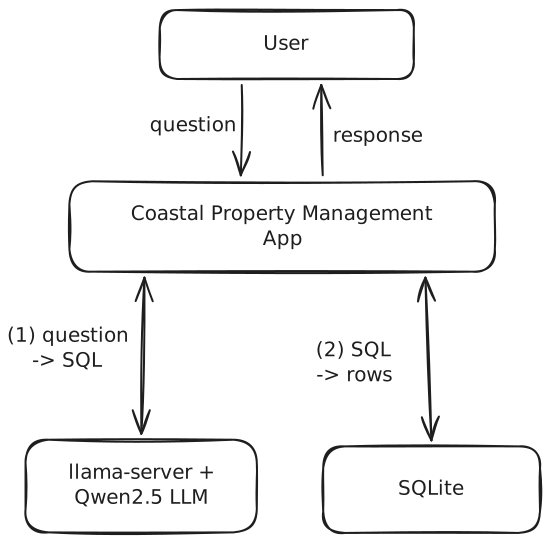
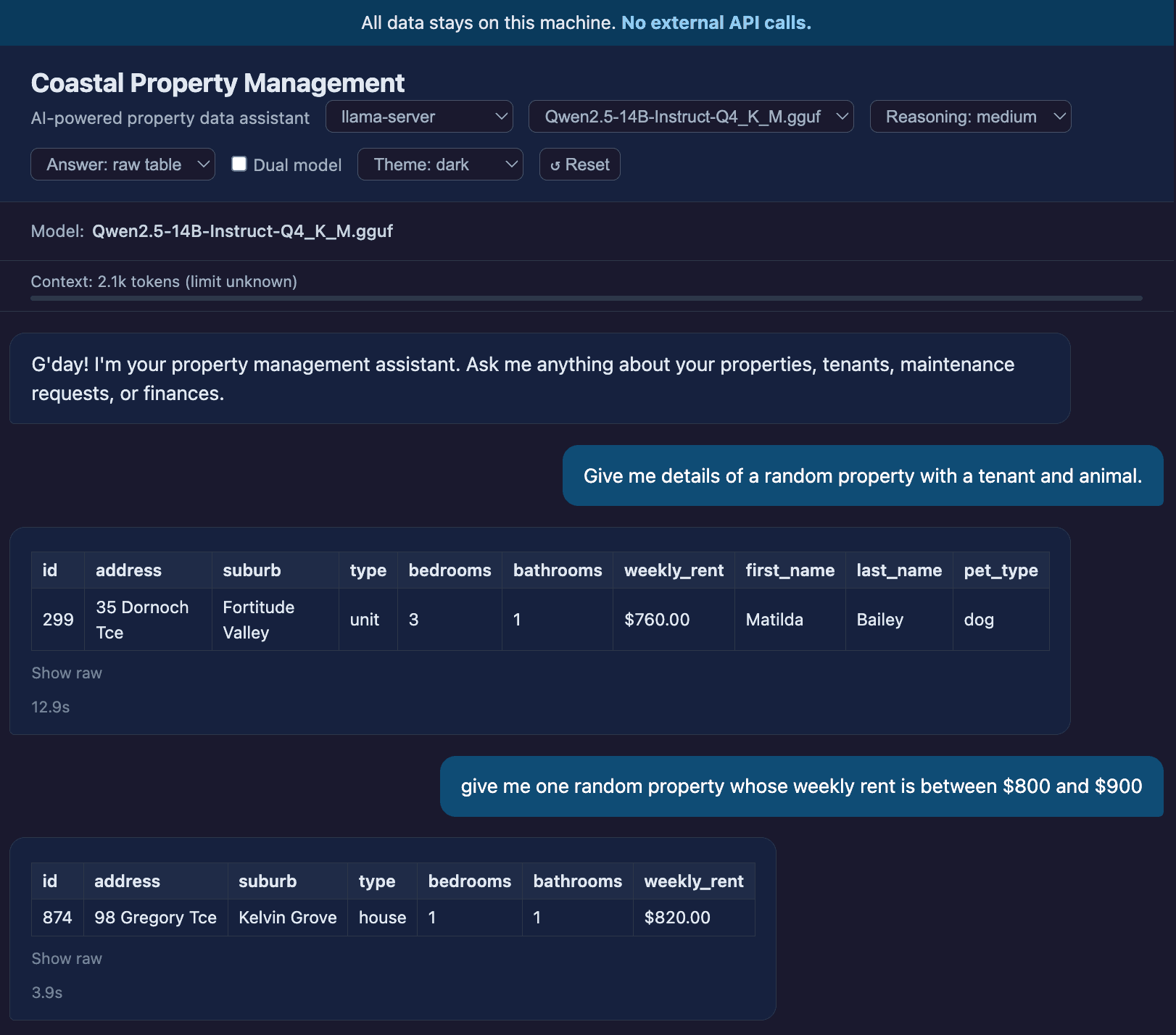
In practice it looks like this. The model is Qwen2.5-14B-Instruct at Q4 quantisation, served by llama-server on the same machine; the database is a SQLite file seeded with fictional Queensland property-management data.
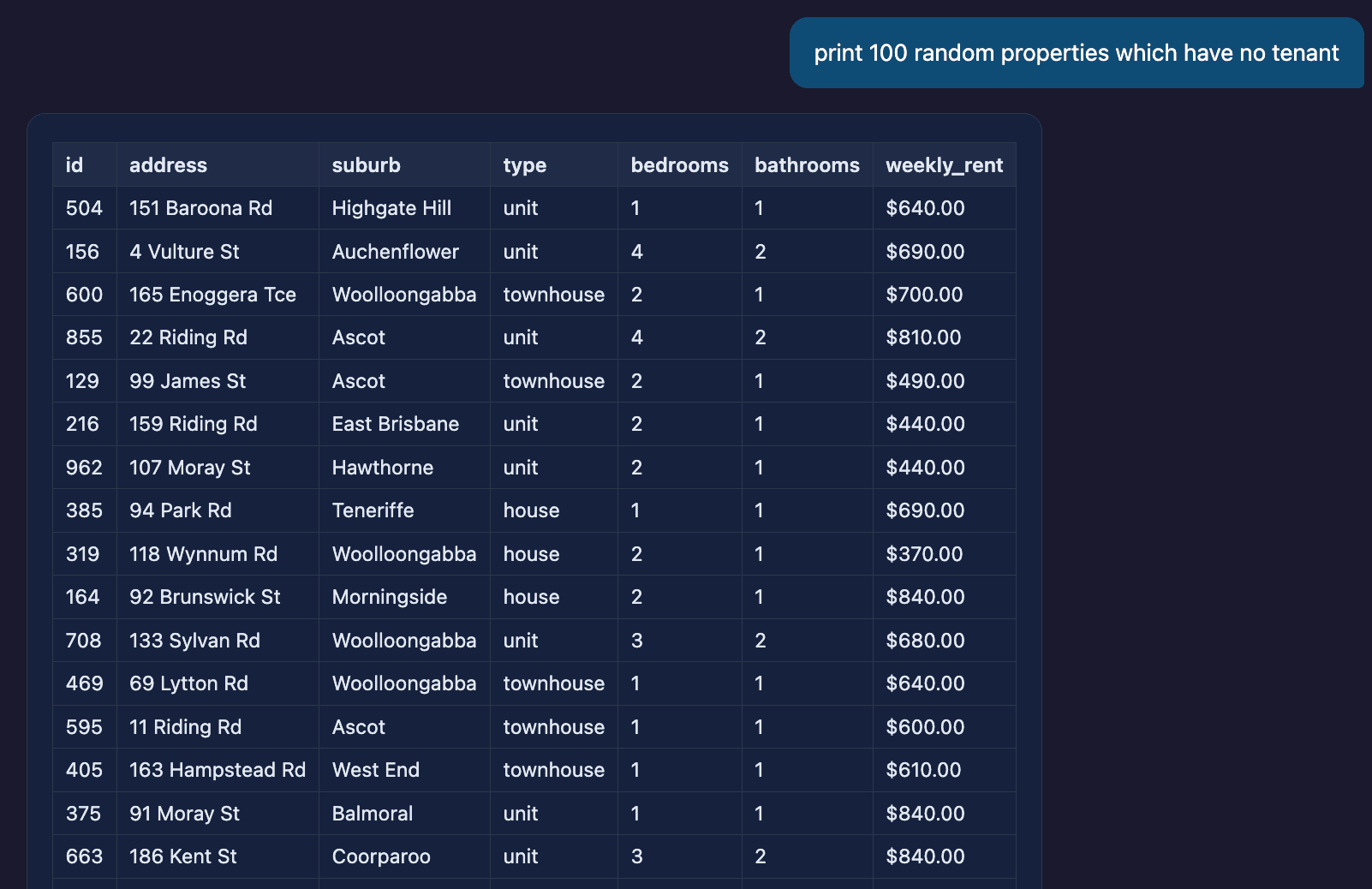
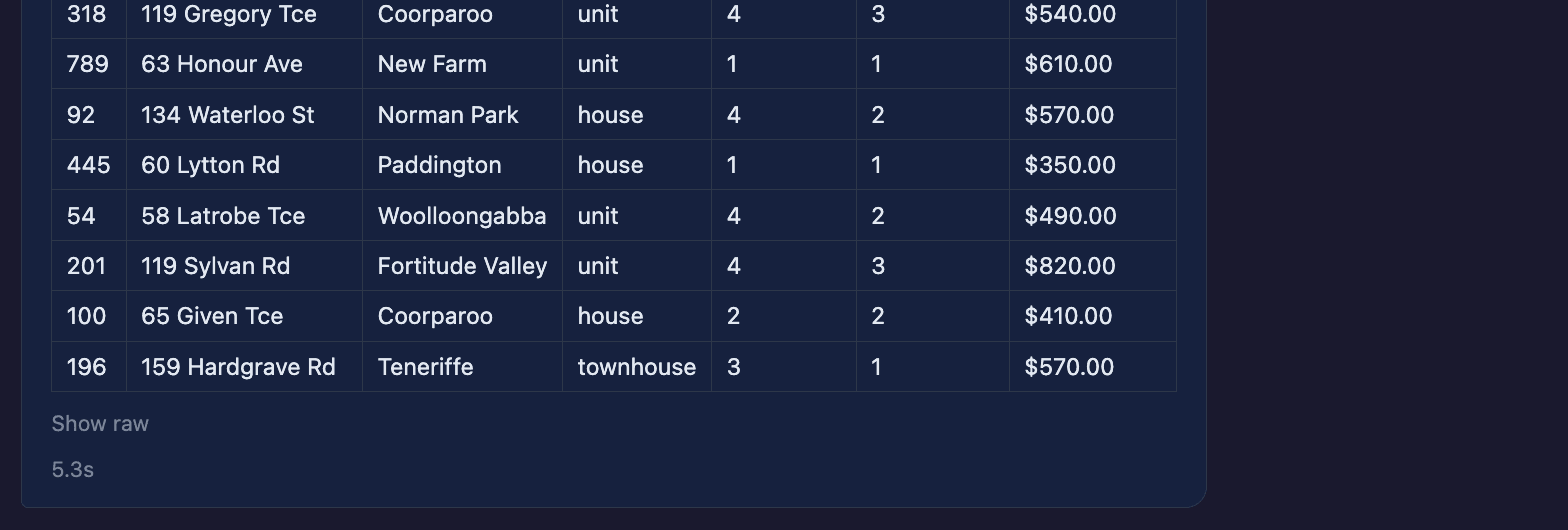
Result-set size barely changes things. A query that returns 100 rows comes back in 5.3 s — only marginally slower than the single-row queries above, because the LLM's job (writing one SQL statement) is the same regardless of how many rows it ends up matching.
2. Tool-calling, no SQL written
The LLM is not asked to write SQL at all. Instead it is given a small set of typed tools, exposed by a layer the demo calls the Domain Tool Engine — functions that wrap the database with named parameters, validation, and a constrained surface. The model decides which tool to call and with what arguments; the engine runs the actual query and returns structured results.
This shifts the contract. The model no longer has to get SQL syntactically and semantically right; it only has to pick a tool and fill in its arguments. In practice this is the most accurate of the three — the engine's schema does the work the model would otherwise have to do, and the surface area for hallucinated table or column names collapses.
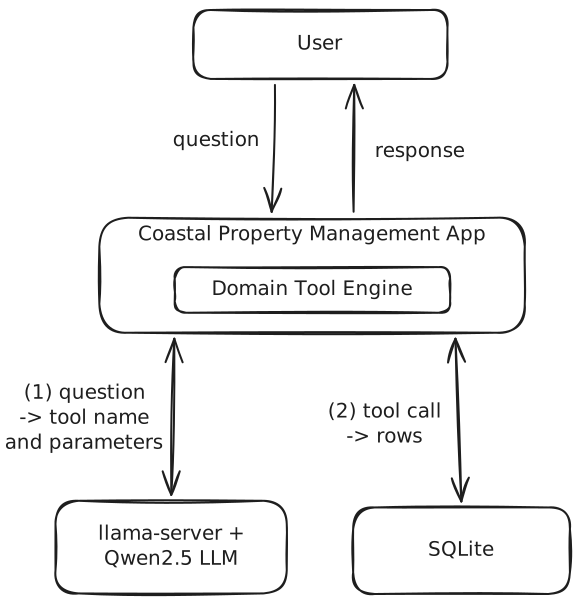
The downsides of this approach become immediately visible. Consider this example:
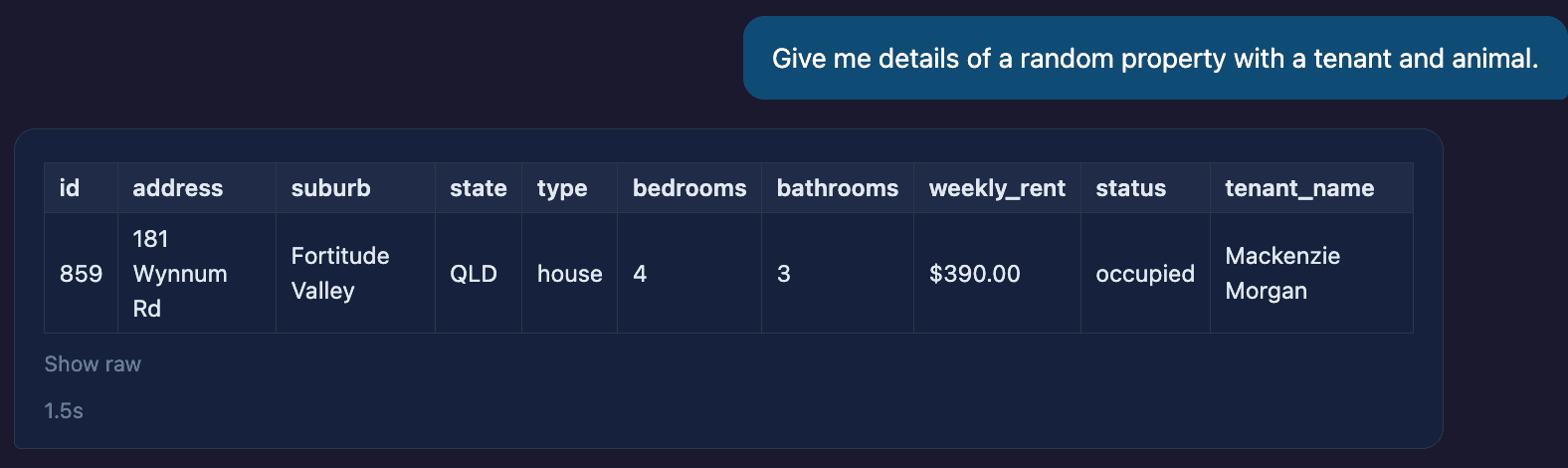
What we gained in accuracy we lose in flexibility. The engine selects the tool that is most suitable to the task, and simultaneously has to make compromises — here, a tool that returns property and tenant data, with no slot for the pet, so the pet quietly drops out of the answer.
So we try again, this time being a little more explicit:
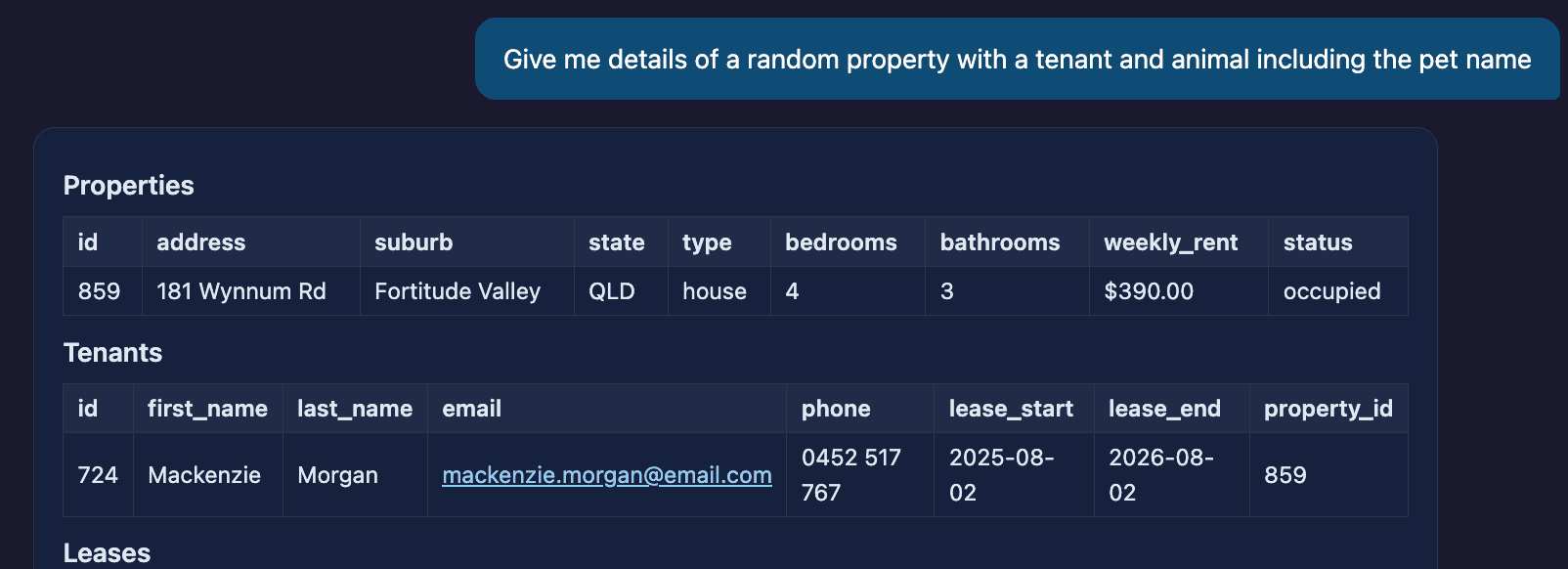

This time the model attempts to get information about the pet by invoking a different function, but it omits to set the pet constraint — so a property is returned that does not actually have a pet. This immediately exposes a new limitation: the model is not trained for the specific tool-calling required for our database. It can pick tools, but it does not know that “with an animal” should restrict the property selection to ones with a pet record on file. The constraint is a domain rule, and the off-the-shelf model has no way to know it.
Where each one fits
| Version | Latency | Scales with result size | Accuracy | Question shape |
|---|---|---|---|---|
| Direct SQL, raw rows | Fast | Yes (5.3 s for 100 rows) | Depends on the SQL | Anything the schema can answer |
| Tool-calling | Fastest on small queries (1.5 s) | Yes | Highest, by construction | Only what the engine has tools for |
Summary
Two viable patterns came out of the demo. They are not equivalent, and neither is shippable on its own.
Direct SQL, raw rows trades narration for flexibility. The LLM only has to write a single SQL statement, which keeps it fast at any result-set size — 100 rows came back in 5.3 s — and lets the user ask anything the schema can answer. The cost is that the result is a table; turning that into a sentence is an exercise for the reader.
Tool-calling via the Domain Tool Engine trades flexibility for accuracy. Hallucinated columns are impossible by construction, and small queries return in 1–2 s. The cost is that the model can only ask the questions the engine has tools for, and the questions it asks are bounded by what the model already knows about the schema — which is, currently, nothing specific to our database.
Where this would go next
- Agentic loops. Both patterns above are single-shot: the LLM gets one chance to write the SQL, or one chance to pick a tool. An agentic version — multiple LLM calls, the model checking its own work and retrying when the result does not match the question — would address both kinds of failure on the page. In direct SQL it would catch a query that returned nothing useful and revise it; in tool-calling it would chain tools correctly, picking a property that has a pet before looking up the pet record.
- More capable models, in a sovereign region. Agentic loops mean more LLM calls per question, and that is the cost. A 14B model running locally on an M1 starts to feel slow under multi-step reasoning — we ran experiments that confirmed this; they are not shown here. The natural next step is a more capable model hosted in a region-locked cloud environment: an Australian-resident hyperscaler region, or a sovereign AI provider. The “no data leaves the machine” purity goes; the “no data leaves the country” property is preserved, and the model has the headroom to plan, retry, and chain tool calls without timing out.